

Ask a busy agent with a healthy flow of inquiries what limits their business, and the answer isn’t always demand. What caps the number of clients they can handle is everything that arrives with each one: a record to create, a follow-up to remember, a showing to schedule, a contract to prepare, a signature to chase, and a buyer who wants to know what happens next.
Each task is small. Together they add up to a coordination tax, and past a certain point that tax starts setting the ceiling: response times stretch, follow-ups slip, and taking on another client becomes harder. Hiring an assistant is one way to relieve the pressure, but before adding headcount, it’s worth asking how much of that workload actually requires another person.
Real estate workflow automation means handling the recurring handoffs around a deal in software instead of in memory: capturing an inquiry, booking a showing, sending the reminder, generating the contract, collecting the signature. Bitrix24 real estate CRM software keeps those steps in one workspace, so routine ones move forward without an agent starting each by hand.
Much of this is plain CRM automation, no AI required. A reminder doesn’t have to think, and a lead-routing rule doesn’t need a language model. Rules run the process, AI handles the reading and summarizing, and the agent keeps the judgment.
Every Deal Runs on Two Clocks
The agent’s clock counts tasks: call the seller, send the disclosure, book the inspection. The client’s clock counts moments of uncertainty: When will I hear back? What happens next? Has anything changed?
The two rarely agree. An agent can clear twenty tasks in a day and still leave a buyer with four unanswered questions. I’ve come to think clients judge a transaction less by how busy their agent was than by how often they had to wonder.
Automation helps on both clocks. A reminder, a confirmation, a status update and a returned signature are each minor, but each one sent late adds another stretch of waiting. On the agent’s side, keeping messages, calls, showings, documents and tasks on one client record means less to re-check across an inbox, a calendar and a folder. Bitrix24 can also invite clients into a shared workspace, so they can follow progress without seeing internal files.
How Do You Automate Lead Follow-Up in Real Estate?
A useful automation has three parts: the trigger that starts it, the action the system takes next, and the exception for when the expected next step doesn’t happen. Teams often plan the first two and skip the third, so the process works until something goes wrong.
For lead follow-up, the trigger is a new inquiry. Bitrix24 captures it from a web form or a connected channel into one pipeline, can send an automatic first reply, and can route the lead to an agent based on rules you set. The exception is silence. If the first attempt doesn’t connect, a rule can create the next follow-up task after a wait you define, so it doesn’t depend on someone remembering.
Good lead management automation means an inquiry doesn’t have to wait for someone to notice it manually. A lead that arrives while the agent is in a showing can be acknowledged, assigned and queued for the next attempt before the agent is free to respond personally. The same record can also feed email or SMS campaigns for leads who aren’t ready yet, which is where real estate marketing automation and lead nurturing belong: after the inquiry is captured, not instead of answering it.
How Do You Schedule Showings With Less Back-and-Forth?
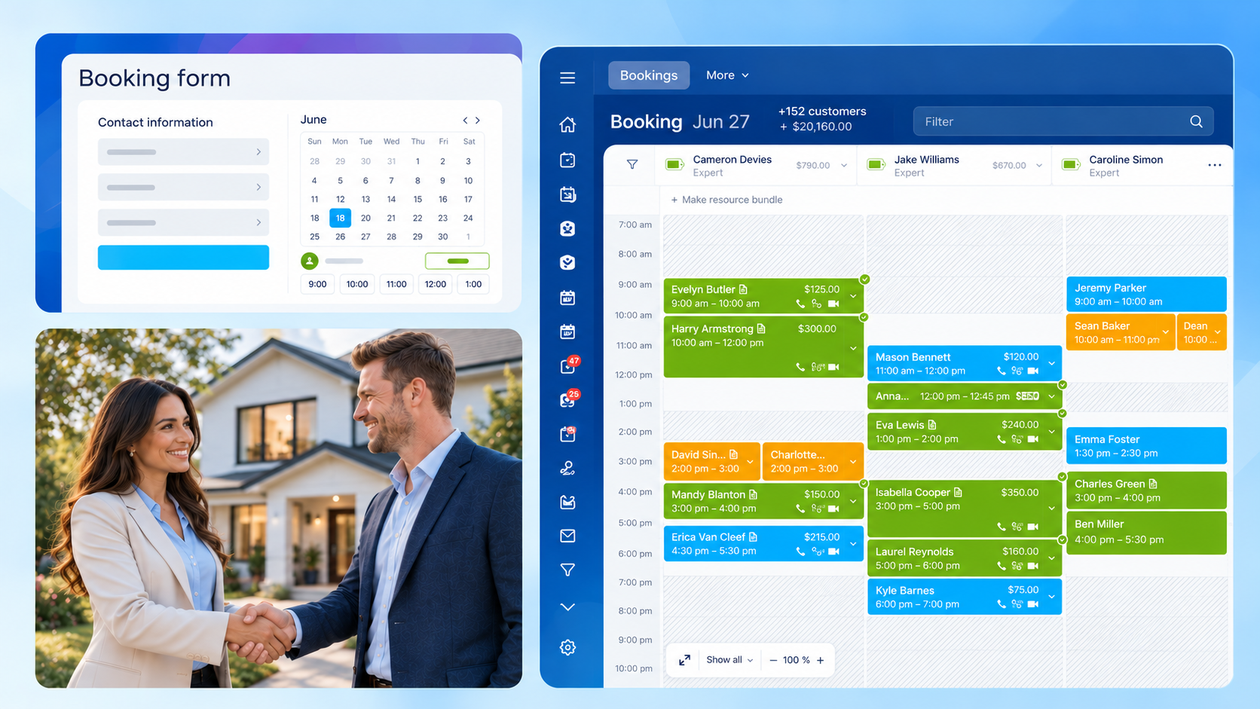
A showing shouldn’t require a miniature negotiation about everyone’s calendar. Once a buyer is ready to visit, Bitrix24 can offer available times through a booking form on the website. The appointment stays connected to the client’s CRM record, and reminders handle the routine confirmation before the visit.
Cancellations are where this becomes more useful. If a slot suddenly opens, the agent doesn’t have to begin another round of messages to fill it. A waitlist can put that time back in play with another prospect. Nobody gets another hour in the day, of course. The agent simply spends fewer minutes coordinating the hours already there.
How Do You Speed Up Contract Signing?
The trigger is a deal reaching the right stage. A Bitrix24 automation rule creates the contract using data from the deal, so nobody retypes names, addresses and terms, then sends it for e-signature by SMS or email. Each step is tracked in the deal.
The exception is the signature that never arrives, so that’s the one to design for. Bitrix24 tracks the document status in the deal, and a separate follow-up rule can be set to nudge the client or alert the agent if it sits unsigned. Contract automation in real estate is mostly about removing two things: the retyping and the chasing.
What Happens When Another Agent Takes Over a Deal?
A handover quickly reveals how much of a deal lives in the system and how much still depends on the individual agent. Say a colleague has to step in unexpectedly. A phone number and a few notes won’t tell them what the client was promised, what happened last week or what needs attention next.
When conversations, appointments, documents and outstanding tasks sit around the same client record, the incoming agent has that context from the start. There’s less need to piece the deal together from scattered notes or ask the client to repeat information they’ve already provided. Ideally, the change happens inside the team without disrupting the client experience.
How Do You Protect Client Documents and Personal Data?
One place for the whole transaction sounds convenient. It also raises an obvious question: who gets to see what? Real estate records can contain contracts, identification documents and other personal information, so access needs its own rules.
Bitrix24 permissions can restrict sensitive files to the people who need them, while version history helps teams trace changes to documents. Teams can also collect consent for personal data use through chat. The point is to make information easier to work with without making it easier for everyone to access.
Where Does AI Fit, and Where Doesn’t It?
After a call, an agent faces a pile of admin: record what was said, update the record, create the next task, remember what the client asked for. Bitrix24 CoPilot can transcribe and summarize supported CRM calls and fill in deal fields, which trims that pile. Availability depends on your plan.
The line I’d draw runs between waiting and judgment. When a client is waiting for a step, such as a reminder, a confirmation or a first-pass summary, automate it. When a client is waiting for a person, keep it with the person. A seller reconsidering the price doesn’t want a scheduled nudge, and a buyer reacting to an inspection report doesn’t want a status update from a system. Negotiating, working out why a buyer is hesitating and earning trust stay human work. The aim is to clear the routine around those conversations, not to replace them.
What Should You Automate First?
Start with lead follow-up. It has the shortest window between inquiry and lost opportunity and changes daily work the least. Showing scheduling comes next, because delays there ripple into everything after. Contracts and post-call follow-up come once the earlier handoffs run reliably. Each one frees something different: attention, calendar space, end-of-deal hours, and the minutes that pile up after every call.
That’s a default, not a rule. To find your own order, spend a week logging every time an inquiry, a showing request or a document waits on a person. The waits tend to cluster around a few handoffs, and those are the first candidates.
Before automating anything, decide who owns each inquiry, when follow-up should happen and what triggers escalation. Rules and workflows can enforce those decisions, but they can’t make them. Automating the distribution of leads nobody owns just spreads the confusion faster.
You don’t need an ROI model to see whether it’s working. Track the time from inquiry to first response, the messages it takes to confirm a showing, the days a contract sits unsigned and the number of overdue follow-ups. If those numbers fall, the ceiling is moving.
Start With One Handoff
Start with the inquiry. Set the acknowledgment, the agent alert and the second attempt, then watch what changes over a week before touching anything else. Between showings, the Bitrix24 mobile app puts the full client record in your pocket, so you can check a deal before you walk in.
That’s how automation helps agents handle more clients: routine work takes less attention, leaving more for the human work of advising, negotiating and building trust.
Explore Bitrix24 for real estate to bring these workflows together, then start with the handoff that costs you the most time and see how much more room that creates in your day for clients.
