
 Every office deserves a productivity tool capable of handling day to day office needs. These include editing PDFs, creating, converting, and sharing PDF documents, transforming mere paperwork into editable PDF files, among others. Everyone wants to maximize the productivity of documentation using a tool that works for Macs, Android, iOS and Windows available for virtually all types of devices such as PDFelement.
Adobe Acrobat comes into mind for most people, when dealing with PDFs. Today, I’m going to introduce a better alternative to you, which you’ll definitely love due to its huge range of toolsets.
PDFelement has been rated the perfect Adobe Acrobat alternative for a while now and for very good reasons, particularly its competitive price way less than that of Adobe Acrobat. Here is a comparison of different key features between PDFelement and Adobe Acrobat that makes this very clear. Meanwhile, the discount is available at the end of the article.

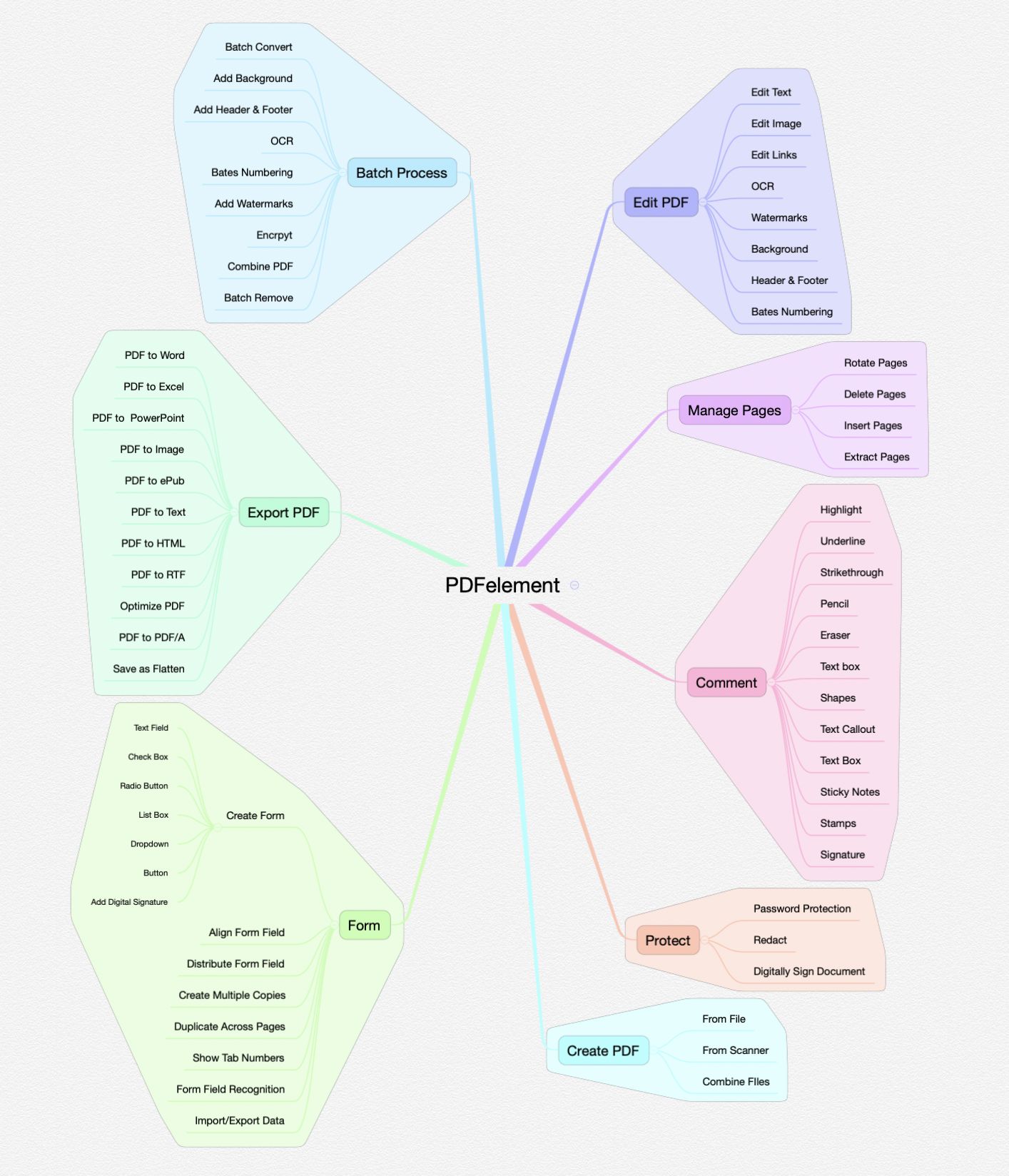
PDF Editing
One of the clearest displays of quality by PDFelement, when compared with Adobe Acrobat, is the ability to edit PDF to arguably the best quality anywhere. Both tools actually edit PDF documents including PDF pages, links, images, and text, footers and headers, backgrounds and watermarks among others. Font color changing is also easy and fast, including the ability to type in and delete text while adjusting images as required.

Image editing isn’t complicated but easy and superbly done in PDFelement as in Adobe Acrobat. You can actually add images, remove, copy, replace, rotate, crop and extract images as you want in both without any hassle.
Even so, PDFelement is more intuitive, particularly in text editing where intuitive paragraph text editing in single line modes of editing is possible. You also get the chance to work with the font type of your choice, including style and size that you want the PDF files to end up with.
PDFelement while intuitive also does a commendable job just like Adobe Acrobat in PDF page editing. It allows you to split and merge PDF pages, including inserting, extracting, cropping and replacing pages in PDF documents. You can also manage page boxes while adding the page labels you want to appear on PDF documents.
PDF editing rating: PDFelement-4 stars
Adobe Acrobat-5 stars
PDF Annotation
One of the beauties of using a useful Adobe Acrobat alternative like PDFelement is the host of tools you’re able to make the most of. This includes the ability to use high-quality advanced PDF editor tool to annotate PDF documents effectively. PDFelement isn’t costly like Adobe Acrobat and other programs out there yet it offers a highly unique way of annotating PDFs right away.
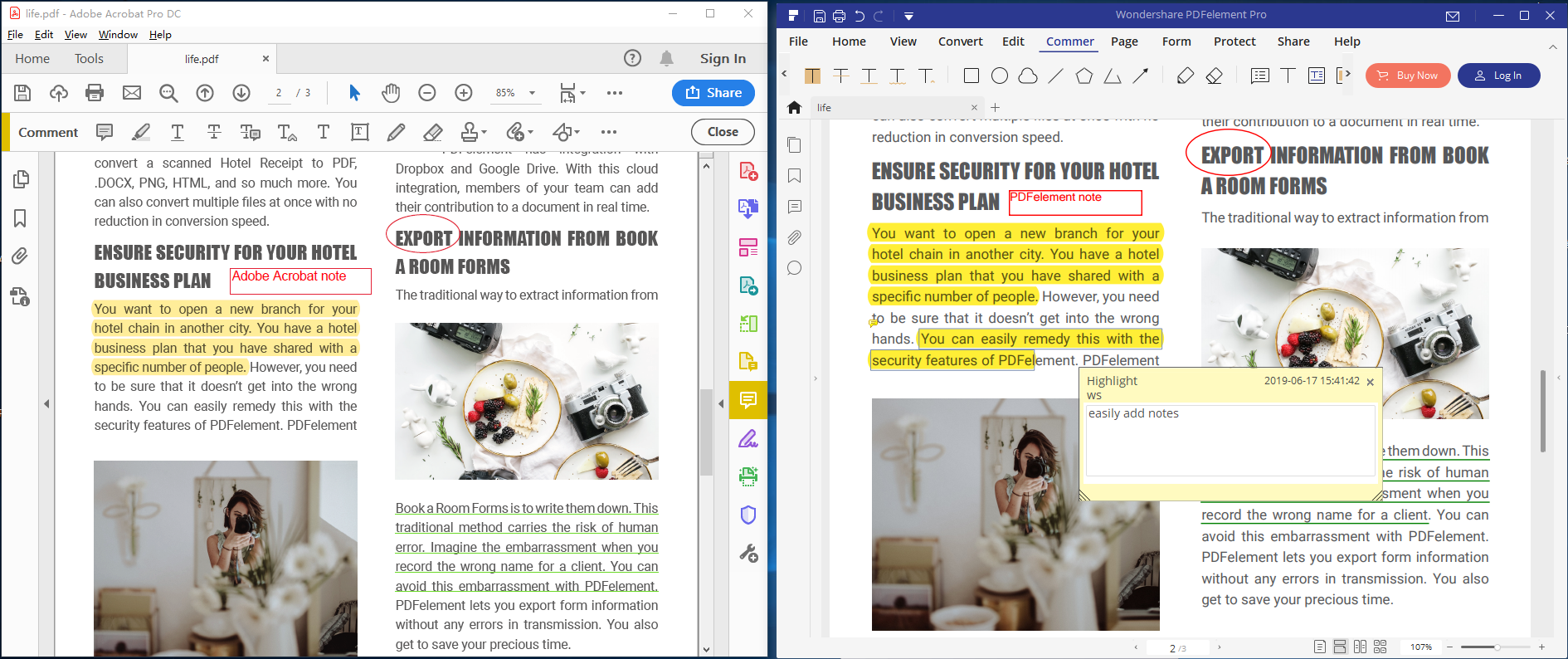
Just like Adobe Acrobat, PDFelement also allow you to add comments into your PDF documents with sticky notes and highlights while making the most of markup and drawing tools. Other actions you can carry out in your PDFs include highlighting text, underlining and strikethrough, editing images and texts and even copying segments of texts. Annotation allows you to appraise your PDF documents the way you want and share additional information with your team or change details on exact pages.

Both PDFelement and Acrobat also include image selection actions where you’re able to select images. In the process you’re able to carry out certain functionalities like copying images, highlighting texts, adding sticky notes and editing both images and texts.
Once a specific action has been highlighted and selected, both PDFelement and Adobe Acrobat will avail certain options you can choose fast to complete the actions you’ve in mind such as deleting comments or adding notes.
Annotation tool rating: PDFelement-5 Stars
Adobe Acrobat-5 stars
Batch Process
It’s possible that you deal with hundreds of PDF forms or just a dozen at a time of the same format and topic. Obviously, you might want to extract certain details or data from every of one of the forms and perhaps insert the information in Spreadsheets. Rather process all the hundreds of forms each at a time and waste so much time and expend so much energy PDFelement allows you to batch process them.
PDFelement is arguably the easiest and fastest batch processer tool anywhere. You can use the tool to create the forms you want while collecting the data that you need. In PDFelement you only need to go to the startup page and select batch process and pop-up windows will help you complete the simple and quick process.
On the other hand, Adobe Acrobat also includes batch processing where you must use the Action Wizard from tools to do it, a rather complicated process. The Action Wizard is generally where you’re allowed to make the most of commands to carry out different actions related to your PDF files. The actions can be carried out to more than one PDF document or just a single one meaning batch processing of PDF files, scanning documents, among other actions.
Batch Process Rating: PDFelement-5 stars
Adobe Acrobat-4 stars
PDF conversion and creation
When you really want to convert and create PDF documents you need a tool capable of creating from common formats and converting also from PDF to other formats while being able to create PDFs from all manner of content. PDFelement is a quality Adobe Acrobat alternative allowing users to convert PDF documents to file formats mostly in use in offices, academic settings and other professional areas such as Microsoft formats like Excel, Word, and PowerPoint, text, image files among others. It has sufficient formats for common use.
Adobe Acrobat though expensive includes commonly used formats and some you probably never use. You can create or convert PDFs from diverse formats such as common ones like Microsoft Office formats to complex and uncommon ones like Adobe PostScript, web pages, Adobe Illustrator, Corel Word Perfect, 3D files to Autodesk AutoCAD among others.
Obviously, the important thing is ensuring the tool you’re using to create and convert PDF actually covers most formats that you use often. PDFelement has probably all the formats you’ll ever need while Acrobat includes some unique ones to itself.
PDF Creation/Conversion Rating: PDFelement-4 stars
Adobe Acrobat-5 stars
Price
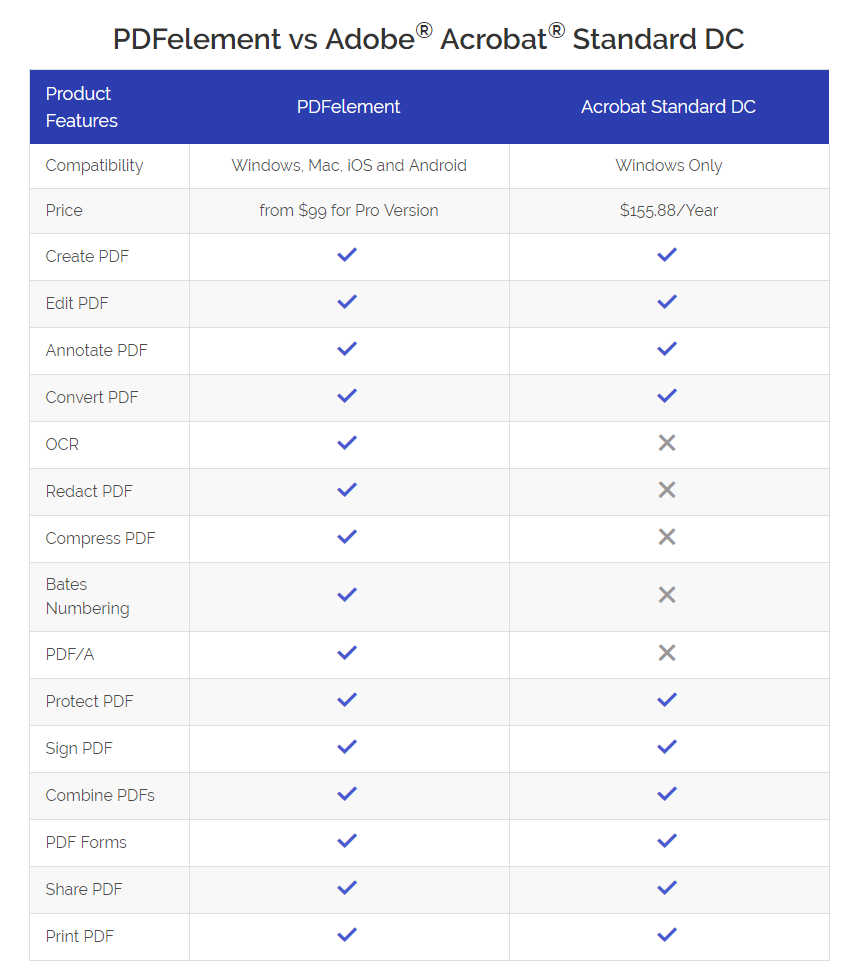
PDFelement and Adobe Acrobat offer virtually similar features such as turning scanned documents into fillable, searchable and editable PDFs, exporting PDFs to diverse formats and vice versa, editing, signing, filling forms and adding comments as well as sharing documents with others.
With features that are almost similar PDFelement is way affordable and highly competitive in terms of price. PDFelement is available free with limited features while advanced features are availed at a one-time cost per year and you don’t have to keep paying annual payments. Annual purchase of Adobe Acrobat is way more expensive.
Price Rating: PDFelement-5 stars
Adobe Acrobat-3 stars

Everyone deserves a working PDF management tool capable of creating, converting, editing and filling PDF forms, among other functionalities. PDFelement, while compared with Adobe Acrobat, is arguably the perfect Adobe alternative if you consider the fact that their features are almost similar while PDFelement is competitive in terms of cost. In some areas, PDFelement was much better and efficient than Adobe Acrobat and much easier to use. You can get 50% off to get PDFelement for a limited time
